Skip to content
Tech Tips Now

TechTipsNow – Tips, News, Tricks, and Error Fixing.

  • News
    • Updates & Patch Note
  • How To
  • Opinions
  • Firmware
    • Device Type
      • Phone
      • TV
      • Others
  • Guide
  • Keyboard Shortcuts
  • How to Fix
  • About Us
    • Contact Us
    • Privacy Policy

Home » How To » Page 65

Category: How To

Using technology without any “How to” is like you’re not using it properly.

Many questions must come to your mind because when you question, you get some additional knowledge that is not in your database (Mind).

This category is dedicated to all the tech lovers and users out there who have lots of questions in their mind but haven’t found proper answers.

If you have landed in this category, it means you are also looking for an answer.

We hope you’ll find yours! 

open the Control Panel
February 10, 2021 How To

How to open the Control Panel in Windows 10 (8 Methods)

You all know that the Control panel is a very useful tool for changing any application, uninstalling any unwanted application,

Continue reading
How to reinstall Microsoft store
February 4, 2021 How To

How to reinstall Microsoft store in Windows 10

Sometimes, after completing the system restore, you are not able to access the Microsoft Store, and you start searches related

Continue reading
How to Find your Windows 10 Product Key
January 31, 2021 How To

How to Find your Windows 10 Product Key?

How to Find Windows 10 Product Key: If you’re using Windows 10 and looking for your product key and you’ve

Continue reading
update Windows 10 KB4589212
January 28, 2021 How To

How to update Windows 10 KB4589212 for v20H2 and v2004

Windows 10 KB4589212 Update: A new update for v20h2 and v2004 has been released by Microsoft on 26 Jan 2021. It

Continue reading
How to Backup and Restore Registry
January 23, 2021 How To

How to Backup and Restore Registry in Windows- TechTipsNow

Registry Editor is a database of settings that stores all low-level settings for the Windows operating system. You should keep

Continue reading
How to change the product key on Windows 10
January 11, 2021 How To

How to change the product key on Windows 10?

How to change the product key on Windows 10: If we talk about the product key, then this is the

Continue reading
How to Enable Accent Color Theme in Microsoft Edge
January 4, 2021 How To

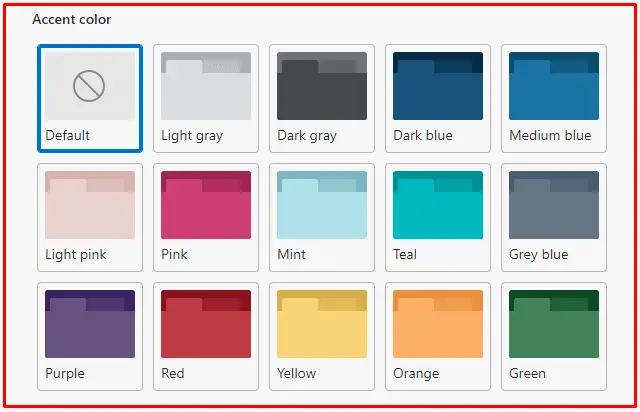
How to Enable Accent Color Theme in Microsoft Edge

Enable Accent Color Theme in Microsoft Edge: If you are using a chromium-based browser, then it has a by-default option

Continue reading

How to open local group policy editor in windows 10
January 3, 2021 How To

How to open a local group policy editor in windows 10

How to open local group policy editor: If you want to control all kinds of Windows settings via a simple

Continue reading

How to Cancel Noom Subscription on Android Phone
January 2, 2021 How To

How to Cancel Noom Subscription on Android Phone

How to Cancel Noom Subscription: Hey! Are you looking for the answer to the question- “How to Cancel Noom Subscription

Continue reading
Disable Microsoft Edge
December 30, 2020 How To

How to Disable Microsoft Edge in Windows 10?

If you are using windows 10 and looking for the answer to the question –How to Disable Microsoft Edge in

Continue reading

Open Registry Editor in Windows 10
December 29, 2020 How To

How to Open Registry Editor in Windows 10?

A lot of third-party applications and Windows too stored their all settings in the registry. And you can troubleshoot tasks

Continue reading
How to Enable or Disable Camera or Webcam in Windows 10
December 25, 2020 How To

How to Enable or Disable Camera in Windows 10?

Enable or Disable Camera in Windows 10: You all know that Camera is an in-built application in all Windows 10

Continue reading

Posts pagination

«Previous Posts 1 … 63 64 65 66 Next Posts»

Latest Posts

  • Fix Microsoft Edge WebView2 (msedgewebview2.exe) Consuming High Memory
  • Safari Keeps Rewinding Videos: Fix It on Mac, iPhone, and iPad
  • How to Block Pop-ups on Brave Browser (Windows, Mac, and Mobile)
  • Classic Indented View Doesn’t Work in Outlook: How to Fix It
  • Fastest Windows Browser in 2026: Which Browser Should You Use?
  • Fix (MsMpEng.exe) Antimalware Service Executable High Memory Usage
  • Boost Download Speed in Chrome on Windows & Mac
  • Pinterest Not Working in Chrome but Fine on Edge? Try This!
  • Why Is My Cursor White in Word? How do I Fix It?
  • Automatic Repair Couldn’t Repair Your PC in Windows 11? Try This!

DMCA.com Protection Status

Note: All Tradmarks and Logos are used on this website for information purpose only.

Rights Reserved |2020-2026|@ Tech Tips Now